Latest review
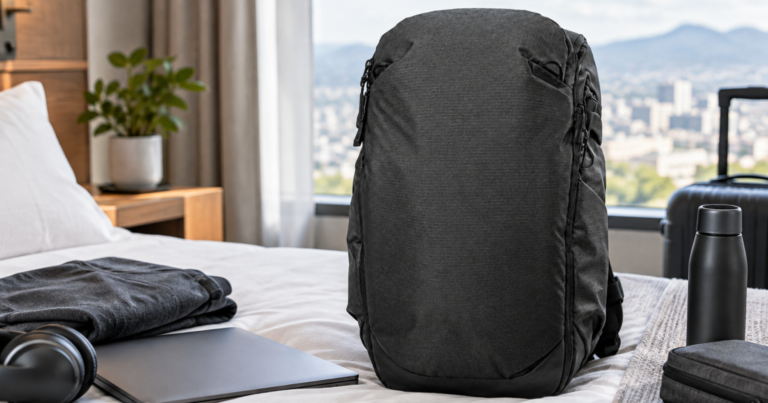
Peak Design Travel Backpack 30L Review: premium one-bag practicality
A premium expandable backpack for short work trips, with strong organization and a few practical trade-offs to weigh…
Read review →
Road Ready Workspace
Build a travel-ready desk setup for hotels, airports, rentals, trains, and every stop between.
Start PackingStart exploring
Travel-work gear has to earn its space in a bag, not just look good on a desk. Find clear evaluations of portable monitors, keyboards,…
Reviews →Working from hotels, rentals, lounges, trains, and borrowed tables takes more than a laptop and optimism. Learn how to shape unfamiliar spaces into dependable…
Working Well Anywhere →A strong mobile office feels intentional from the moment you open your bag. Build smart, compact systems around your laptop, input devices, display options,…
Mobile Office Systems →Video calls, cloud work, and deadlines get stressful when Wi-Fi, audio, lighting, or battery life are uncertain. Plan for stronger connectivity, cleaner calls, smarter…
Connected and Call-Ready →Portable work depends on repeatable habits as much as portable gear. Refine routines for setup, shutdown, time zones, deep work, file access, and travel-day…
Portable Workflows →Temporary desks can be too high, too low, too cramped, or just awkward enough to drain your focus. Improve posture, screen height, keyboard placement,…
Temporary-Space Ergonomics →Freshly published
A premium expandable backpack for short work trips, with strong organization and a few practical trade-offs to weigh…
Read review →Latest guides & advice

Reduce first-trip chaos with a compact setup that covers power, connectivity, calls, packing and arrival checks before work…
Read article →
Stop packing for an ideal desk. Build a compact work system that handles bad outlets, narrow tables, weak…
Read article →Road Ready Workspace helps remote workers, frequent travelers, consultants, founders, creatives, and hybrid professionals turn unpredictable places into dependable work environments. If your office changes from a hotel desk to an airport lounge to a short-term rental kitchen table, your setup needs to do more than fit in a bag. It needs to help you focus quickly, stay connected, protect your body, and avoid the small failures that can derail a workday on the road.
This is a site for people who like the freedom of working from anywhere but do not want to feel like they are constantly improvising. There is a real pleasure in opening your bag and knowing exactly where everything is, setting up in five minutes, joining a call without scrambling for a cable, and finishing focused work from a place that was never designed to be your office. That kind of ease does not happen by accident. It comes from smart packing, realistic gear choices, and a setup built around movement.
Road Ready Workspace is built around that practical middle ground: not a fantasy desk tour, not a pile of gadgets, and not a minimalist challenge for its own sake. The goal is a mobile work system that feels calm, capable, and repeatable, whether you are traveling for one week, one month, or most of the year.
If your laptop regularly comes out in places that were not planned for deep work, you are in the right place. Road Ready Workspace is for people who need to keep producing while moving through hotels, rentals, airports, trains, coworking spaces, client sites, cafes, and temporary desks. It is for people who care about reliable video calls, clean cable management, usable lighting, comfortable typing, stable internet, and not carrying more than they need.
You might be a remote employee working across time zones, a business traveler trying to preserve focus between meetings, a digital nomad balancing productivity with mobility, or a freelancer who needs a professional setup without a permanent office. You might travel with one backpack, one carry-on, or a checked bag full of project gear. The exact packing style can vary, but the core need is the same: a work setup that performs consistently under changing conditions.
This site is also for people who have already learned that “just bring your laptop” is not enough. A laptop alone does not solve poor posture, weak Wi-Fi, dead batteries, bad lighting, noisy rooms, limited outlets, awkward desk heights, or the quiet stress of not knowing whether your setup will hold together when the workday starts.
Working while traveling is not difficult because any one problem is impossible. It is difficult because the small problems stack up. A desk is too high. The chair is too low. The only outlet is across the room. The Wi-Fi is fast until your meeting starts. Your charger is in the wrong pouch. Your neck hurts by lunch. Your second screen sounded useful until it became one more fragile thing to carry. A good mobile office system reduces these points of friction before they steal time and attention.
Road Ready Workspace focuses on the real-world decisions that make mobile work smoother. That includes how to decide what earns space in your bag, how to build a compact desk kit, how to plan for reliable connectivity, how to improve comfort without hauling a full office, and how to choose gear that solves a specific travel problem instead of creating three new ones.
The point is not to carry every possible solution. The point is to understand which problems are most likely for your travel style, then build a compact system that handles them gracefully.
Gear matters, but strategy comes first. A travel-first work setup starts with the work you actually do. Someone who spends six hours a day on video calls has different needs from someone editing documents offline, building spreadsheets, coding, managing projects, recording audio, or presenting to clients. The best kit is not the most expensive or the most minimal. It is the one that supports your work pattern with the fewest weak points.
That means thinking through your setup as a system. Your laptop stand only helps if your keyboard and mouse are easy to pack. A portable monitor only makes sense if it fits your bag, survives transit, and has a power plan. Noise-canceling headphones are excellent, but you may still need a microphone strategy for echoey rooms. A travel router can be useful, but only if it matches the networks and devices you actually use. Every item should have a job, and every job should matter often enough to justify the space.
This is where packing logic becomes powerful. A reliable mobile workspace usually has layers: daily essentials, call-ready tools, comfort upgrades, connectivity backups, and location-specific extras. When those layers are clear, packing gets faster and decisions get easier. You stop repacking from scratch every trip and start refining a setup that travels with you.
Travel work often fails at the body level before it fails at the technology level. A hotel desk that looks fine at night can feel punishing after four hours. A rental with beautiful views may have dining chairs that make serious work miserable. Airport seating can turn a simple task into a shoulder and wrist problem. Comfort is not about being precious. It is about protecting your ability to do good work repeatedly.
Road Ready Workspace treats ergonomics as a travel problem, not an office furniture problem. Most people are not bringing a full monitor arm, office chair, or standing desk on the road. But they can bring a better laptop height solution, a compact input setup, a small lighting fix, a more comfortable audio setup, or a plan for choosing the best workspace in a room. Small changes can create a surprisingly stable work zone.
Good travel comfort also includes recovery and rhythm. Where do you take calls so you are not shouting into a laptop microphone? How do you avoid working all day from the bed because the desk is awkward? How do you build a setup routine that tells your brain, “This is work mode now,” even if the room is new? These details make remote work travel feel less chaotic and more intentional.
Reliable work on the road depends on planning for the moments when the obvious option fails. Hotel Wi-Fi can be inconsistent. Rental internet descriptions can be vague. Airport outlets can be crowded. Trains can have dead zones. International travel can add adapters, carrier limits, and device compatibility questions. None of this needs to be dramatic if you build with backups in mind.
A strong travel setup includes a clear hierarchy: primary internet, backup internet, offline work options, primary charging, emergency power, and the cables or adapters that connect everything. The right plan depends on where you travel, how critical your meetings are, and how many devices you rely on. Some travelers need a robust hotspot strategy. Others only need better pre-trip testing and a battery pack that can actually keep up.
The key is to make failure less disruptive. If the Wi-Fi drops, you know the next move. If your room has one usable outlet, you can still charge your laptop, phone, headphones, and accessories. If your flight is delayed, your work kit is not buried in checked luggage. Confidence comes from having already solved the obvious problems before they become urgent.
There is a lot of appealing travel tech, and some of it is genuinely useful. The challenge is separating smart upgrades from clutter. A good product for a home office is not always a good product for a mobile workspace. Travel gear has to earn its place through size, weight, reliability, setup speed, durability, and how well it handles imperfect environments.
That is why selective gear evaluation matters. A compact keyboard should be judged by typing feel, layout compromises, battery life, and how easily it packs. A USB-C hub should be judged by the ports you truly use, heat, reliability, and cable placement. A portable monitor should be judged by brightness, stability, power needs, protective design, and whether it improves your actual workflow enough to carry it. The best choice is rarely universal. It depends on your work, your bag, and your tolerance for complexity.
Road Ready Workspace helps you think in tradeoffs instead of hype. Sometimes the right move is buying a better tool. Sometimes it is leaving a tool behind. Sometimes it is using a simple item in a smarter way. The win is not owning the most gear. The win is arriving, setting up, and getting to work without friction.
The promise of remote work travel is not just productivity. It is the satisfying feeling of being capable in motion. It is answering an important email from a quiet corner before boarding, taking a clear call from a temporary desk, finishing focused work in a new city, and closing the laptop with enough energy left to enjoy where you are. A well-built mobile workspace supports both the practical demands of work and the freedom that made travel appealing in the first place.
Road Ready Workspace exists to make that balance easier. With the right setup, the road does not have to feel like a downgrade from the office. It can become a flexible, reliable, and even enjoyable way to work. Build the system once, refine it as you travel, and let every stop feel more ready from the moment you open your bag.