A tiny hotel desk changes the stand decision fast: depth matters more than looks, and every cable competes with your coffee, notebook, and elbows. The right portable laptop stand creates screen height without stealing the whole work surface, but only if you plan the layout before unfolding half your bag.
In brief
For remote work from hotels and temporary desks, the most dependable laptop stand is usually a stable high-rise folding model used with a separate keyboard and mouse; it raises the screen and camera while keeping the laptop base out of your typing zone. A low wedge or fold-flat riser is better when the desk is extremely shallow, you are working for a short session, or you need the simplest possible setup.
On a cramped desk, the stand is not the whole workstation. The usable setup depends on four things: how deep the desk is, whether the chair puts your elbows near keyboard height, where the outlet is, and whether the laptop can sit without rocking. Solve those first and the stand becomes helpful instead of theatrical.
Step 1: Read the desk before you unpack everything
Start with a 30-second desk scan. Hotel desks often look workable until you notice the lamp base, wall-mounted outlet, glass top, rounded front edge, or chair arms that stop you from getting close.
- Check depth: If there is not enough space for the laptop, keyboard, and your forearms, use the stand at the back of the desk and keep only the keyboard in the center.
- Find the stable zone: Press lightly on the desk surface near the back, center, and sides. Avoid placing the stand over a seam, drawer gap, loose writing pad, or glossy brochure folder.
- Locate the outlet: If the outlet is behind the desk or far to one side, route the charging cable before you raise the laptop. A cable pulled tight can drag a light stand out of position.
- Move the clutter: Shift the phone, menu cards, ice bucket tray, and decorative objects before setup. Tiny desks punish optimism.
If the desk itself feels springy or uneven, treat stability as the first job. For a deeper troubleshooting sequence, use this guide to stabilize a portable laptop stand on hotel desks before you commit to a full work session.
Step 2: Pick the smallest layout that supports the work
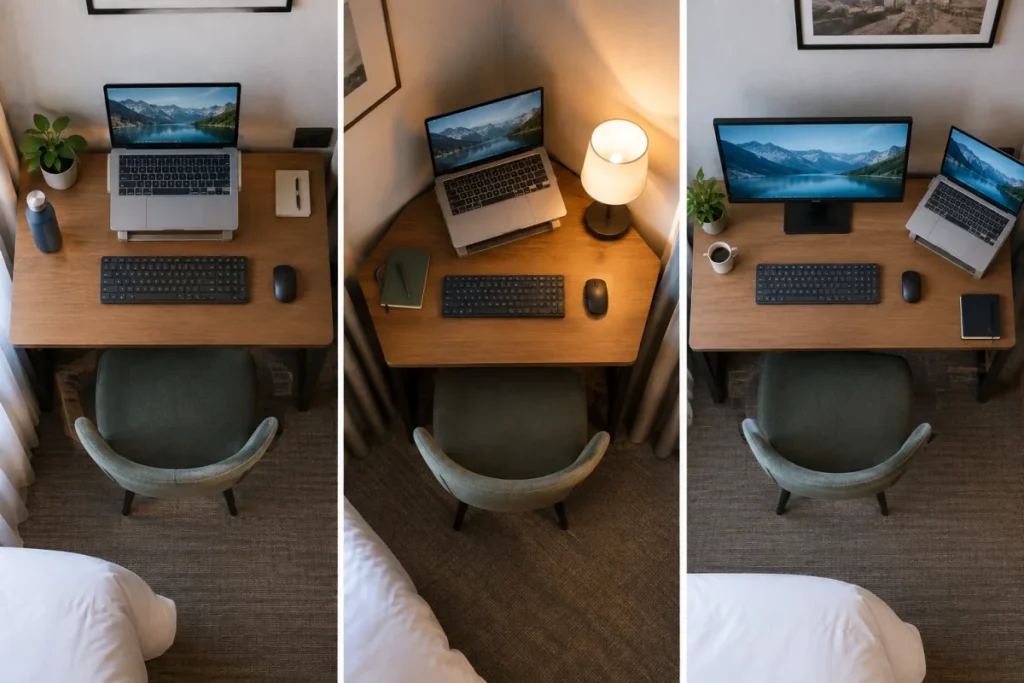
The best layout is the one that gives your hands, eyes, and calls enough support with the fewest moving parts. On a small hotel desk, try these in order.
Back-wall layout
Put the stand near the rear edge of the desk, with the laptop screen close to the wall. Place the external keyboard directly in front of it and the mouse on the side with more clearance. This is the cleanest layout for calls and writing because the screen stays centered and the keyboard sits where your shoulders expect it.
Corner layout
Angle the stand into the back corner when the desk is narrow or when a lamp blocks the center. This gives the mouse more room and can stop the laptop from feeling like it is hanging over the front edge. Keep the laptop camera aimed straight enough for calls; a dramatic corner angle can make you look like you are dialing in from the edge of a witness stand.
Sidecar layout
Use the laptop stand to one side only if you have a separate display, tablet, or larger main screen. On a tiny surface, this layout can get crowded quickly. If you are debating whether a second display earns the space, compare the trade-offs in choosing a second screen for travel workdays before adding another panel to the desk.
Step 3: Set the stand before connecting accessories
Unfold and lock the stand first, then place the laptop, then connect power and accessories. This order prevents the classic hotel-desk move: one hand holding a half-open stand, one hand managing a cable, and one expensive computer making you reconsider your life choices.
- Center the laptop weight: The laptop should sit evenly on the stand supports, not shifted toward one side to make room for a cup or notebook.
- Keep the hinge clear: Make sure the laptop screen opens without hitting the wall, lamp, or shelf above the desk.
- Test a gentle tap: Tap the desk and type a few lines. If the screen shakes badly, lower the stand one notch, move it farther back, or relocate it off a soft desk pad.
- Route cables downhill: Let cables fall naturally toward the outlet, hub, or charger. Do not suspend a hub from the laptop port if the cable is short.
Step 4: Choose height by session length, not by ambition
For a short email session, a low wedge can be fine because it improves the screen angle without requiring much desk space. For a half-day of calls, writing, spreadsheets, or design review, a higher stand paired with a keyboard and mouse usually makes more sense because the screen can come closer to eye level while your hands stay lower.
Do not type for long stretches on a high raised laptop. It lifts your hands, bends your wrists, and turns the stand into a very elaborate discomfort machine. If you are packing a high-rise stand, also pack a compact keyboard and mouse or trackpad. If you are not willing to carry those, choose a lower stand and accept the posture compromise.
For 13- to 16-inch laptops, verify the stand maker’s stated laptop-size and weight guidance before buying or packing it. Larger laptops can work well on travel stands, but the real question is whether the support points, hinge resistance, and desk footprint suit your machine and the desks you actually encounter.
Step 5: Keep the front edge free
The front 6 to 10 inches of desk space are more valuable than they look. That is where your keyboard, wrists, notebook, room key, and coffee all try to live. Protect that zone by pushing the laptop stand back and keeping accessories lean.
- Use a compact keyboard: A full-size keyboard with a number pad can crowd the mouse area on a hotel desk.
- Pack a small mouse or trackpad: Leave enough side clearance for normal movement, not just emergency cursor nudging.
- Put the charger off the work surface: If the outlet placement allows, place the charger on the floor or in the rear corner rather than beside your mouse.
- Limit desktop extras: One notebook is reasonable. A second screen, paper stack, snack plate, and headphones case can turn the desk into a storage shelf with a laptop on top.
What kind of stand works best for hotel desks?
The best portable laptop stand for hotel desk remote work is stable first, compact second, and adjustable only if the adjustment does not introduce wobble. Fold-flat wedge stands pack thin and are fast to deploy, but they usually provide less screen height. High-rise folding stands create a better camera and screen position for longer sessions, but they require a separate keyboard and pointing device.
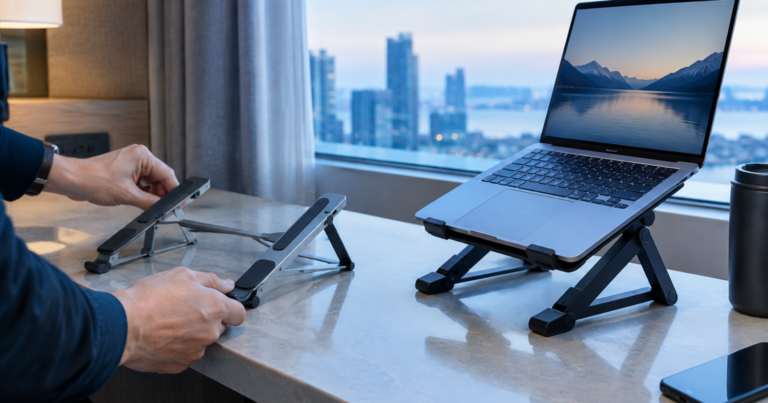
A high-rise folding option such as the Roost Laptop Stand is worth comparing if your workday includes long video calls or focused writing and you already carry external input devices. A slim fold-flat riser may be the better travel choice if your trips involve short sessions, very shallow desks, or one-bag packing where every added piece has to justify itself.
Weight matters, but not in isolation. A stand that is slightly heavier but stable, quick to open, and compatible with your laptop can be less annoying than a lighter stand that needs constant fiddling. Pack burden is not just ounces; it is also setup time, cable mess, and whether the gear makes you hesitate to use it.
Mistakes that make a tiny desk worse
- Raising the laptop too high without a keyboard: Screen height improves, but your hands pay for it.
- Using the bed pillow as a desk fix: It may level the laptop for five minutes, but it is unstable and poor for heat dissipation.
- Placing the stand on loose hotel materials: Leather desk pads, menus, and paper folders can slide under load.
- Ignoring the chair: If the chair is too low, even a good stand cannot fix the entire setup. Add a firm cushion or folded towel to improve your seated position.
- Building the whole kit for a fantasy desk: If most of your work happens on narrow hotel desks, lounge tables, and rental dining nooks, prioritize fast deployment and stability over a miniature home-office replica.
A 5-minute arrival routine
When you arrive, set up in this order: clear the desk, test the stable zone, place the stand, add the laptop, connect power, then add keyboard and mouse. Open your call app or document, type for one minute, and watch for screen shake. If it wobbles, fix it immediately rather than tolerating it all afternoon.
This is also the moment to decide whether the desk can handle a second screen or whether the laptop alone is the cleaner choice. A tiny desk that supports one stable screen is better than a two-screen setup that leaves you hunched, crowded, and afraid to move your coffee.
Build for the room you have
A good hotel-desk setup is not about copying your home office at half scale. It is about getting the screen to a usable height, keeping your hands comfortable, protecting call quality, and leaving enough desk surface to work without constant rearranging.
If you travel often, treat the stand as one part of a flexible system rather than a magic object. The broader mindset is covered well in designing for uncertainty, not a mini home desk: pack for the likely constraints, not the perfect setup you hope the room provides.
The right result is simple: laptop stable, screen raised, keyboard reachable, cables calm, and enough clear space to think. On a tiny hotel desk, that is not minimalism for show. It is how the workday survives the furniture.